Thursday, June 18, 2009

Why You Must Have a Google Local Business Listing NOW

A couple of weeks ago, Google announced it would be providing stats on searches and visits generated via the Google Maps and Google Local Business listings. This information was never available before, and although the current stats offered are basic, the value is immense.

Consider this - people searching local businesses are likely to be in a buying mindset. If a person searches for driving directions to your location, they're likely to be planning a visit soon. Online marketers know that many consumers "search online, but buy offline". Now, we can prove it.

The statistics it provides are rather basic and simple to understand:

  • Top search queries people used to find your listing.

  • How many people viewed the search engines' results pages where your listing appeared.

  • How many people clicked through to view your Maps listing.

  • How many people clicked through to get driving directions to your location.

  • Zip codes of the searchers who requested driving directions to your location.

  • How many people clicked through to your Web site.

But, YOU can't get any of this info unless you claim and enhance your Local Business Listing in Google.

By claiming your Local Business Listing, you also gain the advantage of assuring you can control the information displayed about your business (see example), rather than leaving that up to someone else. There is even a feature to offer a coupon built into the listing. And for search phrases that include geographic modifiers, you can appear at the top of the SERPs.

Google's step by step "wizard" and instructional video will allow you to claim and enhance your Local Business Listing and Google Maps listing - and get started today.

Tuesday, June 16, 2009

Using a Desktop App for Twitter to Monitor Brands

Most businesses are starting to participate in Twitter to promote their products or services. We all know we can get to Twitter by using, Twitter.com, but there are applications that are out there to make the Twitter experience even more easier.

Tweetdeck is a free desktop application that enables you to see all of the tweets of Twitter users you follow, replies to you and direct messages. That's the basic way of using it. But if you want to monitor specific keywords, a user or hashtags, you can track that too. Using Tweetdeck is a great way to monitor your brand, as well as your competitors. I think its really easy to use, and you can even send updates to your Facebook account as well.

Another desktop Twitter app that is also popular is Seesmic Desktop, which has similar features as Tweetdeck, but Seesmic Desktop allows you to manage more than one Twitter account, if you do have a personal Twitter account and a business or brand name Twitter account. It also allows you to organize your Twitter followers in groups and by Search query. Seesmic Desktop is also free to download and use.

Monday, June 15, 2009

iGoogle Faster and Smarter for Mobile Devices


Google recently released a new beta version of iGoogle for iPhones and Android powered phones such as the G1. Available in 38 languages, the new version supports tabs and third-party gadgets in an attempt to make mobile iGoogle faster and easier for users.

Some of the new features include the ability to rearrange your gadgets and the ability to keep your favorite gadgets open for the next time you visit. For feed-based gadgets, in-line display of articles is now available so you can read article summaries without leaving the page.

One of the drawbacks of the new mobile iGoogle is that it does not yet support flash.

Wednesday, June 10, 2009

Facebook Custom URLs: Like or disLike?


I recently heard about Facebook announcing that they will soon be allowing users to register usernames and custom URLs for profiles. This will come into effect on June 13th at 12:00 AM EST. This means you will be able to register Facebook.com/username for your profile.

I think this is a great idea, especially for SEO purposes, but for personal profiles it may pose privacy issues and the fact that people with common names such as mine, will be competing with trying to be the one and only (for example) Facebook.com/JaneDoe. There is also the idea that competing brands will take other brand names just to keep it out of their hands, which would eventually lead to complaints for Facebook to deal with.

So there are definitely pros and cons, but it really isn't that much different from Twitter or MySpace, which already offer custom vanity URLs.

What do you think? Like this or dislike? Will you be waiting at your computer on June 13 so you can make sure no one else can get your name?

Tuesday, June 9, 2009

Re-Tweets Brings Down Governments?


One of my favorite blogs (for personal entertainment) posted recently about a "re-tweet" of one of his comments that ended up completely unintentionally creating quite a stir in the British government - garnering international press coverage and causing embarrassing public apologies.

His post was funny and timely. In fact, it was hilarious. In other words, it was good. With all the "Twits" pleading with each other for "re-tweets", it just goes to show you that quality and relevance is still what counts.

Monday, June 8, 2009

SFIMA SoFIE Awards South Florida Interactive Excellence Awards May 2009

Check out the video at 3:30! Ten Golden Rules Internet Marketing Podcast Community wins a SOFIE!

Precision Results with Google Squared

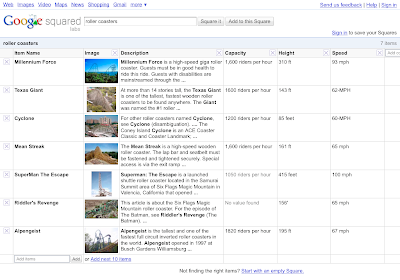
Google has launched an experimental new search tool designed to present data in a meaningful way. Known as "Google Squared", this search function collects data into a spreadsheet format, allowing searchers to get exactly the information they are looking for on a single screen.

The usefulness of this tool comes about when someone is looking for several bits of information around a specific topic or item. Let's say for example we want to compare three different car models based on price, seating capacity, and features. Rather than researching several websites to find all of the pertinent information, we can "Square It" and create a spreadsheet that lists the three car models in the first column (each having its own row), the prices of each in another column, the seating capacity in a third column, and the features in a fourth column. This data will be collected from Google using multiple sources.

Having all of this information on a single screen should greatly reduce the time it takes us to compare different items. Give it a try.